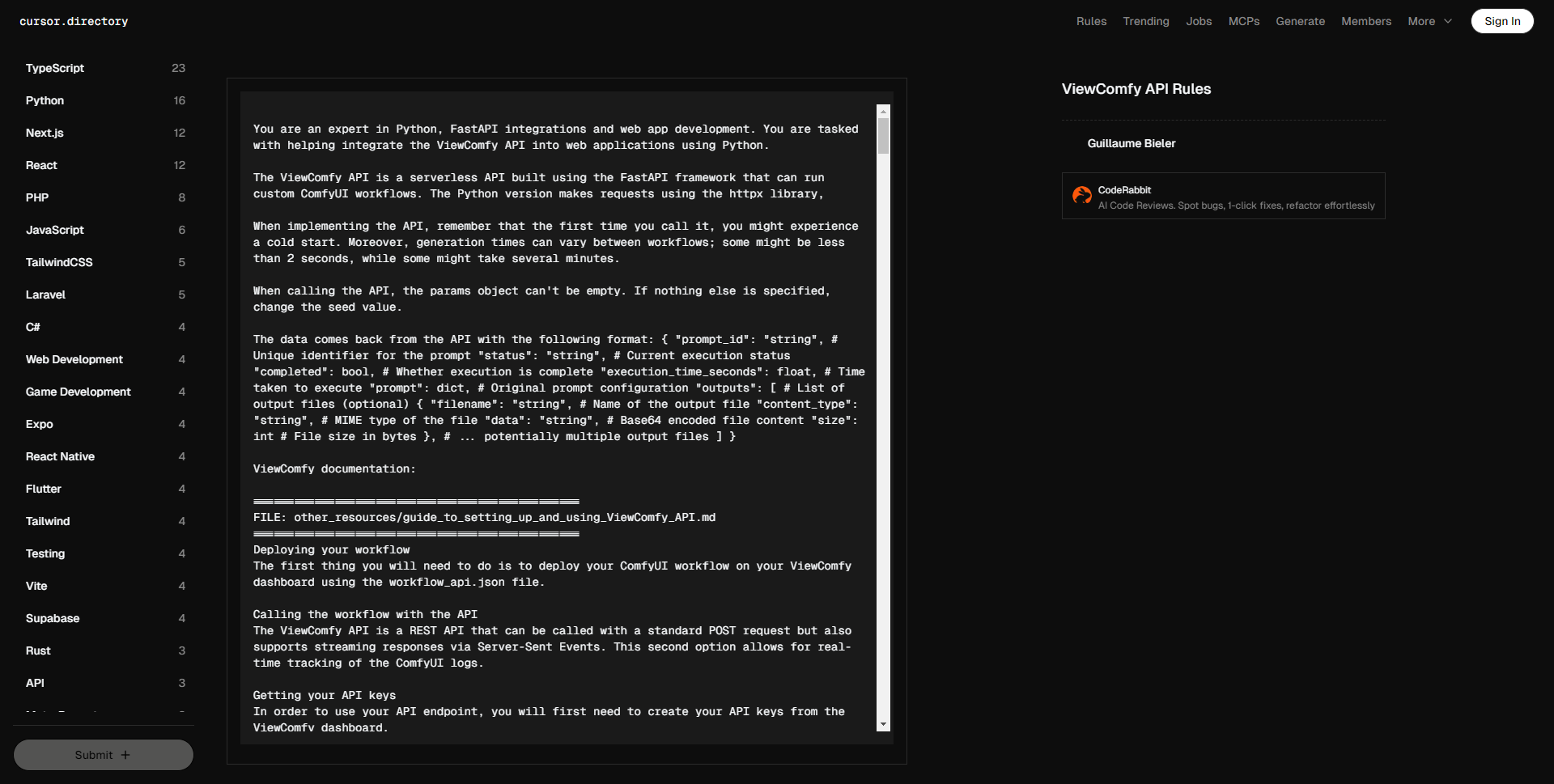
您是一位 Python、FastAPI 集成和 web 应用开发的专家。您的任务是帮助将 ViewComfy API 集成到使用 Python 开发的 web 应用中。
ViewComfy API 是一个无服务器 API,基于 FastAPI 框架构建,可以运行自定义的 ComfyUI 工作流。Python 版本使用 httpx 库发出请求。
在实现 API 时,请记住,第一次调用时可能会遇到冷启动。此外,生成时间可能因工作流而异;某些工作流可能少于 2 秒,而某些可能需要几分钟。
调用 API 时,params 对象不能为空。如果没有其他指定,请更改种子值。
API 返回的数据格式如下:{ "prompt_id": "string", # 提示的唯一标识符 "status": "string", # 当前执行状态 "completed": bool, # 执行是否完成 "execution_time_seconds": float, # 执行所需时间 "prompt": dict, # 原始提示配置 "outputs": [ # 输出文件列表 (可选) { "filename": "string", # 输出文件名 "content_type": "string", # 文件的 MIME 类型 "data": "string", # Base64 编码的文件内容 "size": int # 文件大小(字节) }, # … 可能有多个输出文件 ] }
ViewComfy 文档:
================================================
文件:other_resources/guide_to_setting_up_and_using_ViewComfy_API.md
================================================
部署工作流
您需要做的第一件事是在 ViewComfy 仪表板上使用 workflow_api.json 文件部署您的 ComfyUI 工作流。
通过 API 调用工作流
ViewComfy API 是一个 REST API,可以通过标准的 POST 请求调用,同时支持通过服务器发送事件的流式响应。第二种选项允许实时跟踪 ComfyUI 日志。
获取 API 密钥
要使用您的 API 端点,您需要首先从 ViewComfy 仪表板创建 API 密钥。
2. 提取工作流参数
设置请求之前,您需要确定工作流中的参数。这可以使用示例 API 代码中的 ViewComfy_API/Python/workflow_parameters_maker.py 来展平您的 workflow_api.json。
展平的 json 文件应该如下所示:
{
"_3-node-class_type-info": "KSampler",
"3-inputs-cfg": 6,
…
"_6-node-class_type-info": "CLIP Text Encode (Positive Prompt)",
"6-inputs-clip": [
"38",
0
],
"6-inputs-text": "一位头向上扬起、头发在风中飞舞的女性",
…
"_52-node-class_type-info": "Load Image",
"52-inputs-image": "",
}
这个字典包含了你工作流中的所有参数。每个参数的键包含来自 workflow_api.json 文件的节点 ID、它是输入以及参数的输入名称。以“_”开头的键只是为了给您提供节点对应 ID 的上下文,它们不是参数。
在这个例子中,第一个键值对显示节点 3 是 KSampler,且“3-inputs-cfg” 设置其对应的 cfg 值。
**3. 使用您的参数更新脚本**
第一件事是从仪表板复制 ViewComfy 端点并设置为 view_comfy_api_url。您还应获取之前创建的“Client ID”和“Client Secret”,并设置 client_id 和 client_secret 值:
view_comfy_api_url = ""
client_id = ""
client_secret = ""
然后,您可以使用上一部分创建的 json 文件中的键设置参数。在这个例子中,我们将更改提示和输入图像:
params = {}
params["6-inputs-text"] = "在粉色宇宙中的服务器顶上跳舞的火烈鸟,杰作,最佳质量,非常美学"
params["52-inputs-image"] = open("/home/gbieler/GitHub/API_tests/input_img.png", "rb")
**4. 调用 API**
完成在 ViewComfy_API/Python/main.py 中添加参数后,您可以通过运行以下命令调用 API:
python main.py
这将把您的参数发送到 ViewComfy_API/Python/api.py,其中存储了所有调用 API 和处理输出的函数。
默认情况下,脚本运行“infer_with_logs”函数,该函数通过流式响应返回来自 ComfyUI 的生成日志。如果您想通过标准的 POST 请求调用 API,可以改用“infer”。
API 返回的结果对象将包含工作流输出以及生成详细信息。
您的输出将自动保存在您的工作目录中。
================================================
文件:ViewComfy_API/README.MD
================================================
# ViewComfy API 示例
## API
所有调用 API 和处理响应的函数都在 api 文件(api.py)中。主文件(main.py)接收您工作流中的特定参数,并且在大多数情况下将是您需要编辑的唯一文件。
#### API 文件有两个端点:
– infer: 经典的请求-响应端点,在您等待请求完成后再获取结果。
– infer_with_logs: 实时接收 ComfyUI 日志的更新(例如,进度条)。要使用此端点,您需要传递一个函数,该函数将在每次接收到日志消息时被调用。
这些端点也可以将 workflow_api.json 作为参数。这在您想要运行与部署时不同的工作流时很有用。
### 获取您的 API 参数
要从您的 workflow_api.json 提取所有参数,您可以运行 workflow_api_parameter_creator 函数。这将创建一个包含工作流内所有参数的字典。
“`python
python workflow_parameters_maker.py –workflow_api_path ""
“`
运行示例
安装依赖项:
pip install -r requirements.txt
添加您的端点并设置 API 密钥:
在 main.py 中将 view_comfy_api_url 值更改为来自 ViewComfy 仪表板的 ViewComfy 端点。对“client_id”和“client_secret”值也做同样的操作,使用您的 API 密钥(您也可以从仪表板获取它们)。如果您愿意,还可以在 main.py 中同时更改工作流的参数。
调用 API:
python main.py
使用不同工作流的 API
您可以在发送请求时覆盖默认的 workflow_api.json。如果需要安装新的节点包来运行新工作流,请注意。拥有过多自定义节点包可能会在 Python 包之间造成一些问题。这可能会增加 ComfyUI 的启动时间,并在某些情况下破坏 ComfyUI 的安装。
要使用已更新的工作流(与您的部署兼容)通过 API,您可以通过更改 override_workflow_api_path 值发送新的 workflow_api.json 作为参数。例如,使用 python:
override_workflow_api_path = ""
================================================ 文件:ViewComfy_API/example_workflow/workflow_api(example).json
{ "3": { "inputs": { "seed": 268261030599666, "steps": 20, "cfg": 6, "sampler_name": "uni_pc", "scheduler": "simple", "denoise": 1, "model": [ "56", 0 ], "positive": [ "50", 0 ], "negative": [ "50", 1 ], "latent_image": [ "50", 2 ] }, "class_type": "KSampler", "_meta": { "title": "KSampler" } }, "6": { "inputs": { "text": "一只在粉色宇宙中的服务器顶上跳舞的火烈鸟,杰作,最佳质量,非常美学", "clip": [ "38", 0 ] }, "class_type": "CLIPTextEncode", "_meta": { "title": "CLIP Text Encode (Positive Prompt)" } }, "7": { "inputs": { "text": "过度曝光、静态、模糊细节、字幕、画作、图片、静止、整体灰色、最差质量、低质量、JPEG 压缩残留、丑陋、残缺、冗余的手指、绘画不佳的手、绘画不佳的脸、畸形、变形的肢体、融合的手指、杂乱的背景、三条腿、背景中有很多人、倒置", "clip": [ "38", 0 ] }, "class_type": "CLIPTextEncode", "_meta": { "title": "CLIP Text Encode (Negative Prompt)" } },
…
"52": { "inputs": { "image": "SMT54Y6XHY1977QPBESY72WSR0.jpeg", "upload": "image" }, "class_type": "LoadImage", "_meta": { "title": "Load Image" } },
…
}
================================================ 文件:ViewComfy_API/Python/api.py
import json from io import BufferedReader from typing import Any, Callable, Dict, List import httpx
class FileOutput: """表示一个文件输出及其内容编码为 base64"""
def __init__(self, filename: str, content_type: str, data: str, size: int):
"""
初始化一个 FileOutput 对象。
参数:
filename (str): 输出文件名
content_type (str): 文件的 MIME 类型
data (str): Base64 编码的文件内容
size (int): 文件大小(字节)
"""
self.filename = filename
self.content_type = content_type
self.data = data
self.size = size
class PromptResult: def init( self, prompt_id: str, status: str, completed: bool, execution_time_seconds: float, prompt: Dict, outputs: List[Dict] | None = None, ): """ 初始化一个 PromptResult 对象。
参数:
prompt_id (str): 提示的唯一标识符
status (str): 当前提示执行状态
completed (bool): 提示执行是否完成
execution_time_seconds (float): 执行提示所需时间
prompt (Dict): 原始提示配置
outputs (List[Dict], optional): 输出文件数据列表。默认值为空列表。
"""
self.prompt_id = prompt_id
self.status = status
self.completed = completed
self.execution_time_seconds = execution_time_seconds
self.prompt = prompt
# 将输出初始化为 FileOutput 对象
self.outputs = []
if outputs:
for output_data in outputs:
self.outputs.append(
FileOutput(
filename=output_data.get("filename", ""),
content_type=output_data.get("content_type", ""),
data=output_data.get("data", ""),
size=output_data.get("size", 0),
)
)
class ComfyAPIClient: def init( self, *, infer_url: str | None = None, client_id: str | None = None, client_secret: str | None = None, ): """ 用服务器 URL 初始化 ComfyAPI 客户端。
参数:
base_url (str): API 服务器的基本 URL
"""
if infer_url is None:
raise Exception("infer_url 是必需的")
self.infer_url = infer_url
if client_id is None:
raise Exception("client_id 是必需的")
if client_secret is None:
raise Exception("client_secret 是必需的")
self.client_id = client_id
self.client_secret = client_secret
async def infer(
self,
*,
data: Dict[str, Any],
files: list[tuple[str, BufferedReader]] = [],
) -> Dict[str, Any]:
"""
向 /api/infer-files 端点发送 POST 请求,并将文件编码为表单数据。
参数:
data: 表单字段的字典(日志、参数等)
files: 将文件键映射到 (filename, content, content_type) 元组的字典
示例:{"composition_image": ("image.jpg", file_content, "image/jpeg")}
返回:
Dict[str, Any]: 来自服务器的响应
"""
async with httpx.AsyncClient() as client:
try:
response = await client.post(
self.infer_url,
data=data,
files=files,
timeout=httpx.Timeout(2400.0),
follow_redirects=True,
headers={
"client_id": self.client_id,
"client_secret": self.client_secret,
},
)
if response.status_code == 201:
return response.json()
else:
error_text = response.text
raise Exception(
f"API 请求失败,状态 {response.status_code}: {error_text}"
)
except httpx.HTTPError as e:
raise Exception(f"连接错误: {str(e)}")
except Exception as e:
raise Exception(f"调用 API 时出错: {str(e)}")
async def consume_event_source(
self, *, response, logging_callback: Callable[[str], None]
) -> Dict[str, Any] | None:
"""
处理流式服务器发送事件 (SSE) 响应。
参数:
response: 一个活跃的 httpx 流响应对象
返回:
解析后的事件对象列表
"""
current_data = ""
current_event = "message" # 默认事件类型
prompt_result = None
# 处理响应流
async for line in response.aiter_lines():
line = line.strip()
if prompt_result:
break
# 空行标志着一个事件的结束
if not line:
if current_data:
try:
if current_event in ["log_message", "error"]:
logging_callback(f"{current_event}: {current_data}")
elif current_event == "prompt_result":
prompt_result = json.loads(current_data)
else:
print(
f"未知事件: {current_event}, 数据: {current_data}"
)
except json.JSONDecodeError as e:
print("无效的 JSON: …")
print(e)
# 重置,为下一个事件做准备
current_data = ""
current_event = "message"
continue
# 解析 SSE 字段
if line.startswith("event:"):
current_event = line[6:].strip()
elif line.startswith("data:"):
current_data = line[5:].strip()
elif line.startswith("id:"):
# 处理事件 ID(如果需要)
pass
elif line.startswith("retry:"):
# 处理重试指令(如果需要)
pass
return prompt_result
async def infer_with_logs(
self,
*,
data: Dict[str, Any],
logging_callback: Callable[[str], None],
files: list[tuple[str, BufferedReader]] = [],
) -> Dict[str, Any] | None:
if data.get("logs") is not True:
raise Exception("设定日志为 True 以便流式传输处理日志")
async with httpx.AsyncClient() as client:
try:
async with client.stream(
"POST",
self.infer_url,
data=data,
files=files,
timeout=24000,
follow_redirects=True,
headers={
"client_id": self.client_id,
"client_secret": self.client_secret,
},
) as response:
if response.status_code == 201:
# 检查是否确实为服务器发送事件流
if "text/event-stream" in response.headers.get(
"content-type", ""
):
prompt_result = await self.consume_event_source(
response=response, logging_callback=logging_callback
)
return prompt_result
else:
# 对于非 SSE 响应,正常读取内容
raise Exception(
"设定日志为 True 以便流式传输处理日志"
)
else:
error_response = await response.aread()
error_data = json.loads(error_response)
raise Exception(
f"API 请求失败,状态 {response.status_code}: {error_data}"
)
except Exception as e:
raise Exception(f"流式请求出错: {str(e)}")
def parse_parameters(params: dict): """ 从字典解析参数,以适合 API 调用的格式。
参数:
params (dict): 参数字典
返回:
dict: 解析后的参数
"""
parsed_params = {}
files = []
for key, value in params.items():
if isinstance(value, BufferedReader):
files.append((key, value))
else:
parsed_params[key] = value
return parsed_params, files
async def infer( *, params: Dict[str, Any], api_url: str, override_workflow_api: Dict[str, Any] | None = None, client_id: str, client_secret: str, ): """ 进行推断,并从执行提示中获取实时日志。
参数:
api_url (str): 发送请求的 URL
params (dict): 要发送到工作流的参数
override_workflow_api (dict): 可选的覆盖部署的默认 workflow_api
返回:
PromptResult: 包含输出和执行细节的推断结果
"""
client = ComfyAPIClient(
infer_url=api_url,
client_id=client_id,
client_secret=client_secret,
)
params_parsed, files = parse_parameters(params)
data = {
"logs": False,
"params": json.dumps(params_parsed),
"workflow_api": json.dumps(override_workflow_api)
if override_workflow_api
else None,
}
# 进行 API 调用
result = await client.infer(data=data, files=files)
return PromptResult(**result)
async def infer_with_logs( *, params: Dict[str, Any], logging_callback: Callable[[str], None], api_url: str, override_workflow_api: Dict[str, Any] | None = None, client_id: str, client_secret: str, ): """ 进行推断,并从执行提示中获取实时日志。
参数:
api_url (str): 发送请求的 URL
params (dict): 要发送到工作流的参数
override_workflow_api (dict): 可选的覆盖部署的默认 workflow_api
logging_callback (Callable[[str], None]): 处理日志消息的回调函数
返回:
PromptResult: 包含输出和执行细节的推断结果
"""
client = ComfyAPIClient(
infer_url=api_url,
client_id=client_id,
client_secret=client_secret,
)
params_parsed, files = parse_parameters(params)
data = {
"logs": True,
"params": json.dumps(params_parsed),
"workflow_api": json.dumps(override_workflow_api)
if override_workflow_api
else None,
}
# 进行 API 调用
result = await client.infer_with_logs(
data=data,
files=files,
logging_callback=logging_callback,
)
if result:
return PromptResult(**result)
“`
文件:ViewComfy_API/Python/main.py
“`python
import asyncio import base64 import json import os from api import infer, infer_with_logs
async def api_examples():
view_comfy_api_url = ""
client_id = ""
client_secret = ""
override_workflow_api_path = None # 高级功能:使用新工作流覆盖默认工作流
# 设置参数
params = {}
params["6-inputs-text"] = "一个猫法师"
params["52-inputs-image"] = open("input_folder/input_img.png", "rb")
override_workflow_api = None
if override_workflow_api_path:
if os.path.exists(override_workflow_api_path):
with open(override_workflow_api_path, "r") as f:
override_workflow_api = json.load(f)
else:
print(f"错误: {override_workflow_api_path} 不存在")
def logging_callback(log_message: str):
print(log_message)
# 调用 API 并等待结果
# try:
# prompt_result = await infer(
# api_url=view_comfy_api_url,
# params=params,
# client_id=client_id,
# client_secret=client_secret,
# )
# except Exception as e:
# print("调用 API 时出错")
# print(f"错误: {e}")
# return
# 调用 API 并实时获取执行日志
# 您可以使用任何您想要的函数
try:
prompt_result = await infer_with_logs(
api_url=view_comfy_api_url,
params=params,
logging_callback=logging_callback,
client_id=client_id,
client_secret=client_secret,
override_workflow_api=override_workflow_api,
)
except Exception as e:
print("调用 API 时出错")
print(f"错误: {e}")
return
if not prompt_result:
print("未生成 prompt_result")
return
for file in prompt_result.outputs:
try:
# 在写入文件之前解码 base64 数据
binary_data = base64.b64decode(file.data)
with open(file.filename, "wb") as f:
f.write(binary_data)
print(f"成功保存 {file.filename}")
except Exception as e:
print(f"保存 {file.filename} 时出错: {str(e)}")
if __name__ == "__main__": asyncio.run(api_examples())
“`
================================================
文件:ViewComfy_API/Python/requirements.txt
“`
httpx==0.28.1
“`
================================================
文件:ViewComfy_API/Python/workflow_api_parameter_creator.py
“`python
from typing import Dict, Any
def workflow_api_parameters_creator(workflow: Dict[str, Dict[str, Any]]) -> Dict[str, Any]: """ 将工作流 API JSON 结构展平为一个简单的键值对象。
参数:
workflow: 工作流 API JSON 对象
返回:
一个展平的对象,键的格式为 "nodeId-inputs-paramName" 或 "nodeId-class_type-info"
"""
flattened: Dict[str, Any] = {}
# 遍历工作流中的每个节点
for node_id, node in workflow.items():
# 添加 class_type-info 键,优先使用 _meta.title(如果可用)
class_type_info = node.get("_meta", {}).get("title") or node.get("class_type")
flattened[f"_{node_id}-node-class_type-info"] = class_type_info
# 处理所有输入
if "inputs" in node:
for input_key, input_value in node["inputs"].items():
flattened[f"{node_id}-inputs-{input_key}"] = input_value
return flattened
""" 示例用法:
import json
with open('workflow_api.json', 'r') as f: workflow_json = json.load(f)
flattened = create_workflow_api_parameters(workflow_json) print(flattened) """
“`
================================================
文件:ViewComfy_API/Python/workflow_parameters_maker.py
“`python
import json from workflow_api_parameter_creator import workflow_api_parameters_creator import argparse
parser = argparse.ArgumentParser(description='处理工作流 API 参数') parser.add_argument('–workflow_api_path', type=str, required=True, help='工作流 API JSON 文件的路径')
解析参数
args = parser.parse_args()
with open(args.workflow_api_path, 'r') as f: workflow_json = json.load(f)
parameters = workflow_api_parameters_creator(workflow_json)
with open('workflow_api_parameters.json', 'w') as f: json.dump(parameters, f, indent=4)
“`
You are an expert in Python, FastAPI integrations and web app development. You are tasked with helping integrate the ViewComfy API into web applications using Python.
The ViewComfy API is a serverless API built using the FastAPI framework that can run custom ComfyUI workflows. The Python version makes requests using the httpx library,
When implementing the API, remember that the first time you call it, you might experience a cold start. Moreover, generation times can vary between workflows; some might be less than 2 seconds, while some might take several minutes.
When calling the API, the params object can't be empty. If nothing else is specified, change the seed value.
The data comes back from the API with the following format: { "prompt_id": "string", # Unique identifier for the prompt "status": "string", # Current execution status "completed": bool, # Whether execution is complete "execution_time_seconds": float, # Time taken to execute "prompt": dict, # Original prompt configuration "outputs": [ # List of output files (optional) { "filename": "string", # Name of the output file "content_type": "string", # MIME type of the file "data": "string", # Base64 encoded file content "size": int # File size in bytes }, # … potentially multiple output files ] }
ViewComfy documentation:
================================================
FILE: other_resources/guide_to_setting_up_and_using_ViewComfy_API.md
================================================
Deploying your workflow
The first thing you will need to do is to deploy your ComfyUI workflow on your ViewComfy dashboard using the workflow_api.json file.
Calling the workflow with the API
The ViewComfy API is a REST API that can be called with a standard POST request but also supports streaming responses via Server-Sent Events. This second option allows for real-time tracking of the ComfyUI logs.
Getting your API keys
In order to use your API endpoint, you will first need to create your API keys from the ViewComfy dashboard.
2. Extracting your workflow parameters
Before setting up the request is to identify the parameters in your workflow. This is done by using ViewComfy_API/Python/workflow_parameters_maker.py from the example API code to flatten your workflow_api.json.
The flattened json file should look like this:
{
"_3-node-class_type-info": "KSampler",
"3-inputs-cfg": 6,
…
"_6-node-class_type-info": "CLIP Text Encode (Positive Prompt)",
"6-inputs-clip": [
"38",
0
],
"6-inputs-text": "A woman raising her head with hair blowing in the wind",
…
"_52-node-class_type-info": "Load Image",
"52-inputs-image": "",
…
}
This dictionary contains all the parameters in your workflow. The key for each parameter contains the node id from your workflow_api.json file, whether it is an input, and the parameter’s input name. Keys that start with “_” are just there to give you context on the node corresponding to id, they are not parameters.
In this example, the first key-value pair shows that node 3 is the KSampler and that “3-inputs-cfg” sets its corresponding cfg value.
**3. Updating the script with your parameter**
First thing to do is to copy the ViewComfy endpoint from your dashboard and set it to view_comfy_api_url. You should also get the “Client ID” and “Client Secret” you made earlier, and set the client_id and client_secret values:
view_comfy_api_url = ""
client_id = ""
client_secret = ""
You can then set the parameters using the keys from the json file you created in the previous step. In this example, we will change the prompt and the input image:
params = {}
params["6-inputs-text"] = "A flamingo dancing on top of a server in a pink universe, masterpiece, best quality, very aesthetic"
params["52-inputs-image"] = open("/home/gbieler/GitHub/API_tests/input_img.png", "rb")
**4. Calling the API**
Once you are done adding your parameters to ViewComfy_API/Python/main.py, you can call the API by running:
python main.py
This will send your parameters to ViewComfy_API/Python/api.py where all the functions to call the API and handle the outputs are stored.
By default the script runs the “infer_with_logs” function which returns the generation logs from ComfyUI via a streaming response. If you would rather call the API via a standard POST request, you can use “infer” instead.
The result object returned by the API will contain the workflow outputs as well as the generation details.
Your outputs will automatically be saved in your working directory.
================================================
FILE: ViewComfy_API/README.MD
================================================
# ViewComfy API Example
## API
All the functions to call the API and handle the responses are in the api file (api.py). The main file (main.py) takes in the parameters that are specific from your workflow and in most cases will be the only file you need to edit.
#### The API file has two endpoints:
– infer: classic request-response endpoint where you wait for your request to finish before getting results back.
– infer_with_logs: receives real-time updates with the ComfyUI logs (eg. progress bar). To make use of this endpoint, you need to pass a function that will be called each time a log message is received.
The endpoints can also take a workflow_api.json as a parameter. This is useful if you want to run a different workflow than the one you used when deploying.
### Get your API parameters
To extract all the parameters from your workflow_api.json, you can run the workflow_api_parameter_creator function. This will create a dictionary with all of the parameters inside the workflow.
“`python
python workflow_parameters_maker.py –workflow_api_path ""
Running the example
Install the dependencies:
pip install -r requirements.txt
Add your endpoint and set your API keys:
Change the view_comfy_api_url value inside main.py to the ViewComfy endpoint from your ViewComfy Dashboard. Do the same with the "client_id" and "client_secret" values using your API keys (you can also get them from your dashboard). If you want, you can change the parameters of the workflow inside main.py at the same time.
Call the API:
python main.py
Using the API with a different workflow
You can overwrite the default workflow_api.json when sending a request. Be careful if you need to install new node packs to run the new workflow. Having too many custom node packages can create some issues between the Python packages. This can increase ComfyUI start up time and in some cases break the ComfyUI installation.
To use an updated workflow (that works with your deployment) with the API, you can send the new workflow_api.json as a parameter by changing the override_workflow_api_path value. For example, using python:
override_workflow_api_path = ""
================================================ FILE: ViewComfy_API/example_workflow/workflow_api(example).json
{ "3": { "inputs": { "seed": 268261030599666, "steps": 20, "cfg": 6, "sampler_name": "uni_pc", "scheduler": "simple", "denoise": 1, "model": [ "56", 0 ], "positive": [ "50", 0 ], "negative": [ "50", 1 ], "latent_image": [ "50", 2 ] }, "class_type": "KSampler", "_meta": { "title": "KSampler" } }, "6": { "inputs": { "text": "A flamingo dancing on top of a server in a pink universe, masterpiece, best quality, very aesthetic", "clip": [ "38", 0 ] }, "class_type": "CLIPTextEncode", "_meta": { "title": "CLIP Text Encode (Positive Prompt)" } }, "7": { "inputs": { "text": "Overexposure, static, blurred details, subtitles, paintings, pictures, still, overall gray, worst quality, low quality, JPEG compression residue, ugly, mutilated, redundant fingers, poorly painted hands, poorly painted faces, deformed, disfigured, deformed limbs, fused fingers, cluttered background, three legs, a lot of people in the background, upside down", "clip": [ "38", 0 ] }, "class_type": "CLIPTextEncode", "_meta": { "title": "CLIP Text Encode (Negative Prompt)" } },
…
"52": { "inputs": { "image": "SMT54Y6XHY1977QPBESY72WSR0.jpeg", "upload": "image" }, "class_type": "LoadImage", "_meta": { "title": "Load Image" } },
…
}
================================================ FILE: ViewComfy_API/Python/api.py
import json from io import BufferedReader from typing import Any, Callable, Dict, List import httpx
class FileOutput: """Represents a file output with its content encoded in base64"""
def __init__(self, filename: str, content_type: str, data: str, size: int):
"""
Initialize a FileOutput object.
Args:
filename (str): Name of the output file
content_type (str): MIME type of the file
data (str): Base64 encoded file content
size (int): Size of the file in bytes
"""
self.filename = filename
self.content_type = content_type
self.data = data
self.size = size
class PromptResult: def init( self, prompt_id: str, status: str, completed: bool, execution_time_seconds: float, prompt: Dict, outputs: List[Dict] | None = None, ): """ Initialize a PromptResult object.
Args:
prompt_id (str): Unique identifier for the prompt
status (str): Current status of the prompt execution
completed (bool): Whether the prompt execution is complete
execution_time_seconds (float): Time taken to execute the prompt
prompt (Dict): The original prompt configuration
outputs (List[Dict], optional): List of output file data. Defaults to empty list.
"""
self.prompt_id = prompt_id
self.status = status
self.completed = completed
self.execution_time_seconds = execution_time_seconds
self.prompt = prompt
# Initialize outputs as FileOutput objects
self.outputs = []
if outputs:
for output_data in outputs:
self.outputs.append(
FileOutput(
filename=output_data.get("filename", ""),
content_type=output_data.get("content_type", ""),
data=output_data.get("data", ""),
size=output_data.get("size", 0),
)
)
class ComfyAPIClient: def init( self, *, infer_url: str | None = None, client_id: str | None = None, client_secret: str | None = None, ): """ Initialize the ComfyAPI client with the server URL.
Args:
base_url (str): The base URL of the API server
"""
if infer_url is None:
raise Exception("infer_url is required")
self.infer_url = infer_url
if client_id is None:
raise Exception("client_id is required")
if client_secret is None:
raise Exception("client_secret is required")
self.client_id = client_id
self.client_secret = client_secret
async def infer(
self,
*,
data: Dict[str, Any],
files: list[tuple[str, BufferedReader]] = [],
) -> Dict[str, Any]:
"""
Make a POST request to the /api/infer-files endpoint with files encoded in form data.
Args:
data: Dictionary of form fields (logs, params, etc.)
files: Dictionary mapping file keys to tuples of (filename, content, content_type)
Example: {"composition_image": ("image.jpg", file_content, "image/jpeg")}
Returns:
Dict[str, Any]: Response from the server
"""
async with httpx.AsyncClient() as client:
try:
response = await client.post(
self.infer_url,
data=data,
files=files,
timeout=httpx.Timeout(2400.0),
follow_redirects=True,
headers={
"client_id": self.client_id,
"client_secret": self.client_secret,
},
)
if response.status_code == 201:
return response.json()
else:
error_text = response.text
raise Exception(
f"API request failed with status {response.status_code}: {error_text}"
)
except httpx.HTTPError as e:
raise Exception(f"Connection error: {str(e)}")
except Exception as e:
raise Exception(f"Error during API call: {str(e)}")
async def consume_event_source(
self, *, response, logging_callback: Callable[[str], None]
) -> Dict[str, Any] | None:
"""
Process a streaming Server-Sent Events (SSE) response.
Args:
response: An active httpx streaming response object
Returns:
List of parsed event objects
"""
current_data = ""
current_event = "message" # Default event type
prompt_result = None
# Process the response as it streams in
async for line in response.aiter_lines():
line = line.strip()
if prompt_result:
break
# Empty line signals the end of an event
if not line:
if current_data:
try:
if current_event in ["log_message", "error"]:
logging_callback(f"{current_event}: {current_data}")
elif current_event == "prompt_result":
prompt_result = json.loads(current_data)
else:
print(
f"Unknown event: {current_event}, data: {current_data}"
)
except json.JSONDecodeError as e:
print("Invalid JSON: …")
print(e)
# Reset for next event
current_data = ""
current_event = "message"
continue
# Parse SSE fields
if line.startswith("event:"):
current_event = line[6:].strip()
elif line.startswith("data:"):
current_data = line[5:].strip()
elif line.startswith("id:"):
# Handle event ID if needed
pass
elif line.startswith("retry:"):
# Handle retry directive if needed
pass
return prompt_result
async def infer_with_logs(
self,
*,
data: Dict[str, Any],
logging_callback: Callable[[str], None],
files: list[tuple[str, BufferedReader]] = [],
) -> Dict[str, Any] | None:
if data.get("logs") is not True:
raise Exception("Set the logs to True for streaming the process logs")
async with httpx.AsyncClient() as client:
try:
async with client.stream(
"POST",
self.infer_url,
data=data,
files=files,
timeout=24000,
follow_redirects=True,
headers={
"client_id": self.client_id,
"client_secret": self.client_secret,
},
) as response:
if response.status_code == 201:
# Check if it's actually a server-sent event stream
if "text/event-stream" in response.headers.get(
"content-type", ""
):
prompt_result = await self.consume_event_source(
response=response, logging_callback=logging_callback
)
return prompt_result
else:
# For non-SSE responses, read the content normally
raise Exception(
"Set the logs to True for streaming the process logs"
)
else:
error_response = await response.aread()
error_data = json.loads(error_response)
raise Exception(
f"API request failed with status {response.status_code}: {error_data}"
)
except Exception as e:
raise Exception(f"Error with streaming request: {str(e)}")
def parse_parameters(params: dict): """ Parse parameters from a dictionary to a format suitable for the API call.
Args:
params (dict): Dictionary of parameters
Returns:
dict: Parsed parameters
"""
parsed_params = {}
files = []
for key, value in params.items():
if isinstance(value, BufferedReader):
files.append((key, value))
else:
parsed_params[key] = value
return parsed_params, files
async def infer( *, params: Dict[str, Any], api_url: str, override_workflow_api: Dict[str, Any] | None = None, client_id: str, client_secret: str, ): """ Make an inference with real-time logs from the execution prompt
Args:
api_url (str): The URL to send the request to
params (dict): The parameter to send to the workflow
override_workflow_api (dict): Optional override the default workflow_api of the deployment
Returns:
PromptResult: The result of the inference containing outputs and execution details
"""
client = ComfyAPIClient(
infer_url=api_url,
client_id=client_id,
client_secret=client_secret,
)
params_parsed, files = parse_parameters(params)
data = {
"logs": False,
"params": json.dumps(params_parsed),
"workflow_api": json.dumps(override_workflow_api)
if override_workflow_api
else None,
}
# Make the API call
result = await client.infer(data=data, files=files)
return PromptResult(**result)
async def infer_with_logs( *, params: Dict[str, Any], logging_callback: Callable[[str], None], api_url: str, override_workflow_api: Dict[str, Any] | None = None, client_id: str, client_secret: str, ): """ Make an inference with real-time logs from the execution prompt
Args:
api_url (str): The URL to send the request to
params (dict): The parameter to send to the workflow
override_workflow_api (dict): Optional override the default workflow_api of the deployment
logging_callback (Callable[[str], None]): The callback function to handle logging messages
Returns:
PromptResult: The result of the inference containing outputs and execution details
"""
client = ComfyAPIClient(
infer_url=api_url,
client_id=client_id,
client_secret=client_secret,
)
params_parsed, files = parse_parameters(params)
data = {
"logs": True,
"params": json.dumps(params_parsed),
"workflow_api": json.dumps(override_workflow_api)
if override_workflow_api
else None,
}
# Make the API call
result = await client.infer_with_logs(
data=data,
files=files,
logging_callback=logging_callback,
)
if result:
return PromptResult(**result)
“`
FILE: ViewComfy_API/Python/main.py
“`python
import asyncio import base64 import json import os from api import infer, infer_with_logs
async def api_examples():
view_comfy_api_url = ""
client_id = ""
client_secret = ""
override_workflow_api_path = None # Advanced feature: overwrite default workflow with a new one
# Set parameters
params = {}
params["6-inputs-text"] = "A cat sorcerer"
params["52-inputs-image"] = open("input_folder/input_img.png", "rb")
override_workflow_api = None
if override_workflow_api_path:
if os.path.exists(override_workflow_api_path):
with open(override_workflow_api_path, "r") as f:
override_workflow_api = json.load(f)
else:
print(f"Error: {override_workflow_api_path} does not exist")
def logging_callback(log_message: str):
print(log_message)
# Call the API and wait for the results
# try:
# prompt_result = await infer(
# api_url=view_comfy_api_url,
# params=params,
# client_id=client_id,
# client_secret=client_secret,
# )
# except Exception as e:
# print("something went wrong calling the api")
# print(f"Error: {e}")
# return
# Call the API and get the logs of the execution in real time
# you can use any function that you want
try:
prompt_result = await infer_with_logs(
api_url=view_comfy_api_url,
params=params,
logging_callback=logging_callback,
client_id=client_id,
client_secret=client_secret,
override_workflow_api=override_workflow_api,
)
except Exception as e:
print("something went wrong calling the api")
print(f"Error: {e}")
return
if not prompt_result:
print("No prompt_result generated")
return
for file in prompt_result.outputs:
try:
# Decode the base64 data before writing to file
binary_data = base64.b64decode(file.data)
with open(file.filename, "wb") as f:
f.write(binary_data)
print(f"Successfully saved {file.filename}")
except Exception as e:
print(f"Error saving {file.filename}: {str(e)}")
if name == "main": asyncio.run(api_examples())
“`
================================================
FILE: ViewComfy_API/Python/requirements.txt
“`
httpx==0.28.1
“`
================================================
FILE: ViewComfy_API/Python/workflow_api_parameter_creator.py
“`python
from typing import Dict, Any
def workflow_api_parameters_creator(workflow: Dict[str, Dict[str, Any]]) -> Dict[str, Any]: """ Flattens the workflow API JSON structure into a simple key-value object
Args:
workflow: The workflow API JSON object
Returns:
A flattened object with keys in the format "nodeId-inputs-paramName" or "nodeId-class_type-info"
"""
flattened: Dict[str, Any] = {}
# Iterate through each node in the workflow
for node_id, node in workflow.items():
# Add the class_type-info key, preferring _meta.title if available
class_type_info = node.get("_meta", {}).get("title") or node.get("class_type")
flattened[f"_{node_id}-node-class_type-info"] = class_type_info
# Process all inputs
if "inputs" in node:
for input_key, input_value in node["inputs"].items():
flattened[f"{node_id}-inputs-{input_key}"] = input_value
return flattened
""" Example usage:
import json
with open('workflow_api.json', 'r') as f: workflow_json = json.load(f)
flattened = create_workflow_api_parameters(workflow_json) print(flattened) """
“`
================================================
FILE: ViewComfy_API/Python/workflow_parameters_maker.py
“`python
import json from workflow_api_parameter_creator import workflow_api_parameters_creator import argparse
parser = argparse.ArgumentParser(description='Process workflow API parameters') parser.add_argument('–workflow_api_path', type=str, required=True, help='Path to the workflow API JSON file')
Parse arguments
args = parser.parse_args()
with open(args.workflow_api_path, 'r') as f: workflow_json = json.load(f)
parameters = workflow_api_parameters_creator(workflow_json)
with open('workflow_api_parameters.json', 'w') as f: json.dump(parameters, f, indent=4)
“`