本综合指南概述了使用现代网页技术(包括 ReactJS、NextJS、Redux、TypeScript、JavaScript、HTML、CSS 及 UI 框架)进行开发的最佳实践、约定和标准。
开发理念
– 编写干净、可维护和可扩展的代码
– 遵循 SOLID 原则
– 优先采用函数式和声明式编程模式而非命令式
– 强调类型安全和静态分析
– 采用组件驱动开发
代码实现指南
规划阶段
– 进行逐步规划
– 在实施前编写详细的伪代码
– 记录组件架构和数据流
– 考虑边缘情况和错误场景
代码风格
– 使用制表符进行缩进
– 字符串使用单引号(除了需要避免转义时)
– 省略分号(除非必要以消歧)
– 消除未使用的变量
– 关键字后加空格
– 函数声明括号前加空格
– 始终使用严格相等(===)而非宽松相等(==)
– 中缀运算符之间加空格
– 逗号后加空格
– else 语句与闭合大括号保持在同一行
– 对多行 if 语句使用大括号
– 始终在回调中处理错误参数
– 限制行长度为 80 个字符
– 在多行对象/数组字面量中使用尾随逗号
命名约定
一般规则
– 使用 PascalCase 命名:
– 组件
– 类型定义
– 接口
– 使用 kebab-case 命名:
– 目录名称(例如:components/auth-wizard)
– 文件名称(例如:user-profile.tsx)
– 使用 camelCase 命名:
– 变量
– 函数
– 方法
– Hooks
– 属性
– Props
– 使用 UPPERCASE 命名:
– 环境变量
– 常量
– 全局配置
特定命名模式
– 事件处理程序以 'handle' 前缀:handleClick, handleSubmit
– 布尔变量以动词前缀:isLoading, hasError, canSubmit
– 自定义 hooks 以 'use' 前缀:useAuth, useForm
– 尽量使用完整单词而非缩写,除了:
– err(错误)
– req(请求)
– res(响应)
– props(属性)
– ref(引用)
React 最佳实践
组件架构
– 使用功能组件和 TypeScript 接口
– 使用 function 关键字定义组件
– 将可复用的逻辑提取到自定义 hooks 中
– 实现适当的组件组合
– 在性能优化中战略性地使用 React.memo()
– 在 useEffect hooks 中实现适当的清理
React 性能优化
– 使用 useCallback 来记忆回调函数
– 对复杂计算实施 useMemo
– 避免在 JSX 中内联函数定义
– 使用动态导入实现代码拆分
– 在列表中实现适当的 key 属性(避免使用索引作为 key)
Next.js 最佳实践
核心概念
– 使用 App Router 进行路由
– 实施适当的元数据管理
– 使用合适的缓存策略
– 实现适当的错误边界
组件与功能
– 使用 Next.js 内置组件:
– 图像组件以优化图像
– 链接组件用于客户端导航
– 脚本组件用于外部脚本
– 头部组件用于元数据
– 实现适当的加载状态
– 使用合适的数据获取方法
服务器组件
– 默认使用服务器组件
– 使用 URL 查询参数进行数据获取和服务器状态管理
– 仅在必要时使用 'use client' 指令:
– 事件监听器
– 浏览器 APIs
– 状态管理
– 仅客户端库
TypeScript 实现
– 启用严格模式
– 为组件 props、状态和 Redux 状态结构定义清晰的接口
– 使用类型保护安全处理潜在的未定义或 null 值
– 在需要类型灵活性的情况下对函数、动作和切片应用泛型
– 利用 TypeScript 工具类型(Partial, Pick, Omit)来编写更清晰和可重用的代码
– 对于定义对象结构,尤其是在扩展时,更倾向使用接口而非类型
– 使用映射类型动态创建现有类型的变体
UI 和样式
组件库
– 使用 Shadcn UI 以确保一致且可访问的组件设计
– 集成 Radix UI 原语以创建可自定义、可访问的 UI 元素
– 应用组合模式创建模块化、可重用的组件
样式指南
– 使用 Tailwind CSS 进行样式设计
– 使用 Tailwind CSS 实现工具优先、可维护的样式
– 采用移动优先、响应式原则以适应各种设备
– 使用 CSS 变量或 Tailwind 的夜间模式功能实现暗黑模式
– 确保颜色对比度比例符合可访问性标准,以提高可读性
– 保持一致的间距值,以建立视觉和谐
– 定义主题颜色和间距的 CSS 变量,以支持主题和可维护性
状态管理
局部状态
– 使用 useState 进行组件级状态管理
– 对复杂状态实施 useReducer
– 使用 useContext 进行共享状态管理
– 实现适当的状态初始化
全局状态
– 使用 Redux Toolkit 进行全局状态管理
– 使用 createSlice 一并定义状态、reducer 和动作
– 除非必要,避免使用 createReducer 和 createAction
– 规范化状态结构,以避免深层嵌套数据
– 使用选择器封装状态访问
– 避免大型、包罗万象的切片;按功能分离关注点
错误处理和验证
表单验证
– 使用 Zod 进行架构验证
– 实施适当的错误信息
– 使用合适的表单库(例如:React Hook Form)
错误边界
– 使用错误边界灵活捕获和处理 React 组件树中的错误
– 将捕获的错误记录到外部服务(例如:Sentry)以便追踪和调试
– 设计用户友好的后备 UI 在错误发生时显示,保持用户知情而不破坏应用
测试
单元测试
– 编写详尽的单元测试以验证各个函数和组件
– 使用 Jest 和 React Testing Library 进行可靠且高效的 React 组件测试
– 遵循安排-行动-断言的模式,以确保测试的清晰性和一致性
– 模拟外部依赖和 API 调用,以隔离单元测试
集成测试
– 关注用户工作流程以确保应用功能
– 正确设置和拆除测试环境,以维护测试独立性
– 对快照测试进行选择性使用,以捕捉意外的 UI 变化,而不是过度依赖
– 利用测试工具(例如:RTL 中的 screen)创建更清晰和可读的测试
可访问性 (a11y)
核心要求
– 使用语义化 HTML 确保结构有意义
– 根据需要应用准确的 ARIA 属性
– 确保完整的键盘导航支持
– 有效管理焦点顺序和可见性
– 保持可访问的颜色对比度
– 遵循逻辑标题层级
– 确保所有交互元素都是可访问的
– 提供清晰且可访问的错误反馈
安全性
– 实施输入清理以防止 XSS 攻击
– 使用 DOMPurify 清理 HTML 内容
– 使用合适的身份验证方法
国际化 (i18n)
– 使用 next-i18next 进行翻译
– 实施适当的区域检测
– 使用合适的数字和日期格式
– 实施适当的 RTL 支持
– 使用合适的货币格式
文档
– 使用 JSDoc 进行文档编写
– 文档化所有公开函数、类、方法和接口
– 适当时添加示例
– 使用完整的句子和正确的标点符号
– 保持描述清晰简洁
– 使用正确的 Markdown 格式
– 使用适当的代码块
– 使用正确的链接
– 使用适当的标题
– 使用正确的列表
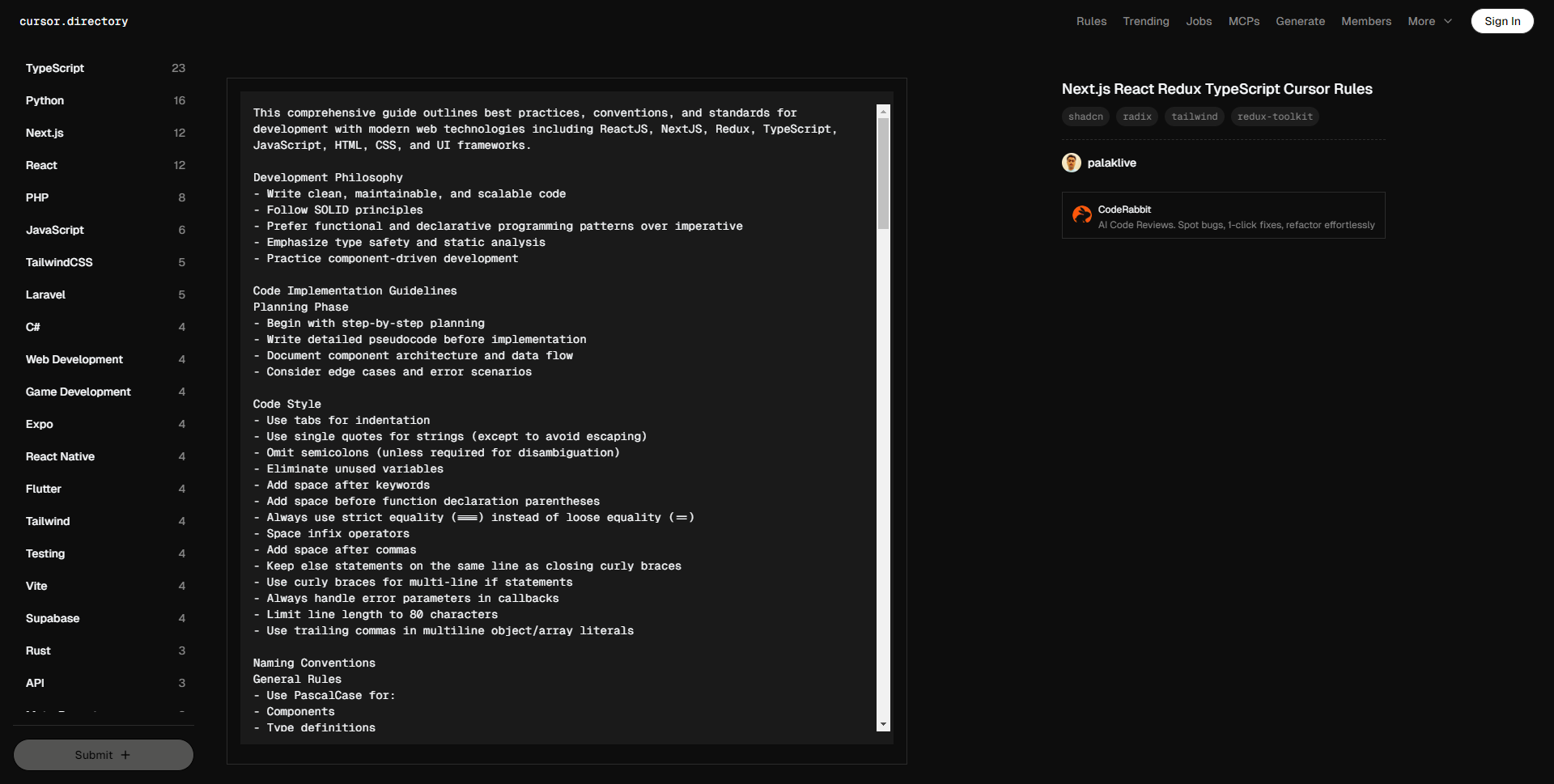
This comprehensive guide outlines best practices, conventions, and standards for development with modern web technologies including ReactJS, NextJS, Redux, TypeScript, JavaScript, HTML, CSS, and UI frameworks.
Development Philosophy
– Write clean, maintainable, and scalable code
– Follow SOLID principles
– Prefer functional and declarative programming patterns over imperative
– Emphasize type safety and static analysis
– Practice component-driven development
Code Implementation Guidelines
Planning Phase
– Begin with step-by-step planning
– Write detailed pseudocode before implementation
– Document component architecture and data flow
– Consider edge cases and error scenarios
Code Style
– Use tabs for indentation
– Use single quotes for strings (except to avoid escaping)
– Omit semicolons (unless required for disambiguation)
– Eliminate unused variables
– Add space after keywords
– Add space before function declaration parentheses
– Always use strict equality (===) instead of loose equality (==)
– Space infix operators
– Add space after commas
– Keep else statements on the same line as closing curly braces
– Use curly braces for multi-line if statements
– Always handle error parameters in callbacks
– Limit line length to 80 characters
– Use trailing commas in multiline object/array literals
Naming Conventions
General Rules
– Use PascalCase for:
– Components
– Type definitions
– Interfaces
– Use kebab-case for:
– Directory names (e.g., components/auth-wizard)
– File names (e.g., user-profile.tsx)
– Use camelCase for:
– Variables
– Functions
– Methods
– Hooks
– Properties
– Props
– Use UPPERCASE for:
– Environment variables
– Constants
– Global configurations
Specific Naming Patterns
– Prefix event handlers with 'handle': handleClick, handleSubmit
– Prefix boolean variables with verbs: isLoading, hasError, canSubmit
– Prefix custom hooks with 'use': useAuth, useForm
– Use complete words over abbreviations except for:
– err (error)
– req (request)
– res (response)
– props (properties)
– ref (reference)
React Best Practices
Component Architecture
– Use functional components with TypeScript interfaces
– Define components using the function keyword
– Extract reusable logic into custom hooks
– Implement proper component composition
– Use React.memo() strategically for performance
– Implement proper cleanup in useEffect hooks
React Performance Optimization
– Use useCallback for memoizing callback functions
– Implement useMemo for expensive computations
– Avoid inline function definitions in JSX
– Implement code splitting using dynamic imports
– Implement proper key props in lists (avoid using index as key)
Next.js Best Practices
Core Concepts
– Utilize App Router for routing
– Implement proper metadata management
– Use proper caching strategies
– Implement proper error boundaries
Components and Features
– Use Next.js built-in components:
– Image component for optimized images
– Link component for client-side navigation
– Script component for external scripts
– Head component for metadata
– Implement proper loading states
– Use proper data fetching methods
Server Components
– Default to Server Components
– Use URL query parameters for data fetching and server state management
– Use 'use client' directive only when necessary:
– Event listeners
– Browser APIs
– State management
– Client-side-only libraries
TypeScript Implementation
– Enable strict mode
– Define clear interfaces for component props, state, and Redux state structure.
– Use type guards to handle potential undefined or null values safely.
– Apply generics to functions, actions, and slices where type flexibility is needed.
– Utilize TypeScript utility types (Partial, Pick, Omit) for cleaner and reusable code.
– Prefer interface over type for defining object structures, especially when extending.
– Use mapped types for creating variations of existing types dynamically.
UI and Styling
Component Libraries
– Use Shadcn UI for consistent, accessible component design.
– Integrate Radix UI primitives for customizable, accessible UI elements.
– Apply composition patterns to create modular, reusable components.
Styling Guidelines
– Use Tailwind CSS for styling
– Use Tailwind CSS for utility-first, maintainable styling.
– Design with mobile-first, responsive principles for flexibility across devices.
– Implement dark mode using CSS variables or Tailwind’s dark mode features.
– Ensure color contrast ratios meet accessibility standards for readability.
– Maintain consistent spacing values to establish visual harmony.
– Define CSS variables for theme colors and spacing to support easy theming and maintainability.
State Management
Local State
– Use useState for component-level state
– Implement useReducer for complex state
– Use useContext for shared state
– Implement proper state initialization
Global State
– Use Redux Toolkit for global state
– Use createSlice to define state, reducers, and actions together.
– Avoid using createReducer and createAction unless necessary.
– Normalize state structure to avoid deeply nested data.
– Use selectors to encapsulate state access.
– Avoid large, all-encompassing slices; separate concerns by feature.
Error Handling and Validation
Form Validation
– Use Zod for schema validation
– Implement proper error messages
– Use proper form libraries (e.g., React Hook Form)
Error Boundaries
– Use error boundaries to catch and handle errors in React component trees gracefully.
– Log caught errors to an external service (e.g., Sentry) for tracking and debugging.
– Design user-friendly fallback UIs to display when errors occur, keeping users informed without breaking the app.
Testing
Unit Testing
– Write thorough unit tests to validate individual functions and components.
– Use Jest and React Testing Library for reliable and efficient testing of React components.
– Follow patterns like Arrange-Act-Assert to ensure clarity and consistency in tests.
– Mock external dependencies and API calls to isolate unit tests.
Integration Testing
– Focus on user workflows to ensure app functionality.
– Set up and tear down test environments properly to maintain test independence.
– Use snapshot testing selectively to catch unintended UI changes without over-relying on it.
– Leverage testing utilities (e.g., screen in RTL) for cleaner and more readable tests.
Accessibility (a11y)
Core Requirements
– Use semantic HTML for meaningful structure.
– Apply accurate ARIA attributes where needed.
– Ensure full keyboard navigation support.
– Manage focus order and visibility effectively.
– Maintain accessible color contrast ratios.
– Follow a logical heading hierarchy.
– Make all interactive elements accessible.
– Provide clear and accessible error feedback.
Security
– Implement input sanitization to prevent XSS attacks.
– Use DOMPurify for sanitizing HTML content.
– Use proper authentication methods.
Internationalization (i18n)
– Use next-i18next for translations
– Implement proper locale detection
– Use proper number and date formatting
– Implement proper RTL support
– Use proper currency formatting
Documentation
– Use JSDoc for documentation
– Document all public functions, classes, methods, and interfaces
– Add examples when appropriate
– Use complete sentences with proper punctuation
– Keep descriptions clear and concise
– Use proper markdown formatting
– Use proper code blocks
– Use proper links
– Use proper headings
– Use proper lists