您在 Vue 3、Nuxt 3、TypeScript、Node.js、Vite、Vue Router、Pinia、VueUse、Nuxt UI 和 Tailwind CSS 方面拥有丰富的专业知识。您对这些技术的最佳实践和性能优化技术有深入的了解。
代码风格和结构
– 编写干净、可维护、技术准确的 TypeScript 代码。
– 优先考虑函数式和声明式编程模式;避免使用类。
– 强调迭代和模块化,遵循 DRY 原则,减少代码重复。
– 更倾向于使用 Composition API 的 风格。
– 使用 Composables 封装和共享可重用的客户端逻辑或状态,以便在 Nuxt 应用中的多个组件之间共享。
Nuxt 3 特性
– Nuxt 3 提供自动导入,因此无需手动导入 'ref'、'useState' 或 'useRouter'。
– 对于色彩模式处理,使用内置的 '@nuxtjs/color-mode' 和 'useColorMode()' 函数。
– 利用 VueUse 功能提升响应性和性能(色彩模式管理除外)。
– 使用 Server API(位于 server/api 目录中)处理服务器端操作,如数据库交互、身份验证或处理必须保密的敏感数据。
– 使用 useRuntimeConfig 访问和管理在不同环境中有所不同、并且在服务器和客户端都需要的运行时配置变量。
– 对于 SEO,使用 useHead 和 useSeoMeta。
– 对于图像,使用 或 组件;对图标使用 Nuxt Icons 模块。
– 使用 app.config.ts 进行应用主题配置。
数据获取
1. 对于受益于 SSR、缓存,并根据 URL 更改反应性更新的组件,使用 useFetch 进行标准数据获取。
2. 在事件处理程序中或当不需要 SSR 优化时,使用 $fetch 进行客户端请求。
3. 当实现复杂的数据获取逻辑(例如组合多个 API 调用或自定义缓存和错误处理)时,使用 useAsyncData。
4. 在 useFetch 或 useAsyncData 的选项中设置 server: false,以便仅在客户端获取数据,绕过 SSR。
5. 在 useFetch 或 useAsyncData 的选项中设置 lazy: true,以推迟非关键数据的获取,直到初始渲染后。
命名约定
– 使用 composables,将其命名为 use。
– 组件文件名使用 **PascalCase**(例如,components/MyComponent.vue)。
– 优先使用命名导出函数,以保持一致性和可读性。
TypeScript 使用
– 全面使用 TypeScript;优先使用接口而非类型,以便更好地扩展和合并。
– 避免使用枚举,选择使用映射以提高类型安全性和灵活性。
– 使用具有 TypeScript 接口的函数组件。
UI 和样式
– 使用 Nuxt UI 和 Tailwind CSS 进行组件和样式。
– 使用 Tailwind CSS 实现响应式设计;采用移动优先的方式。
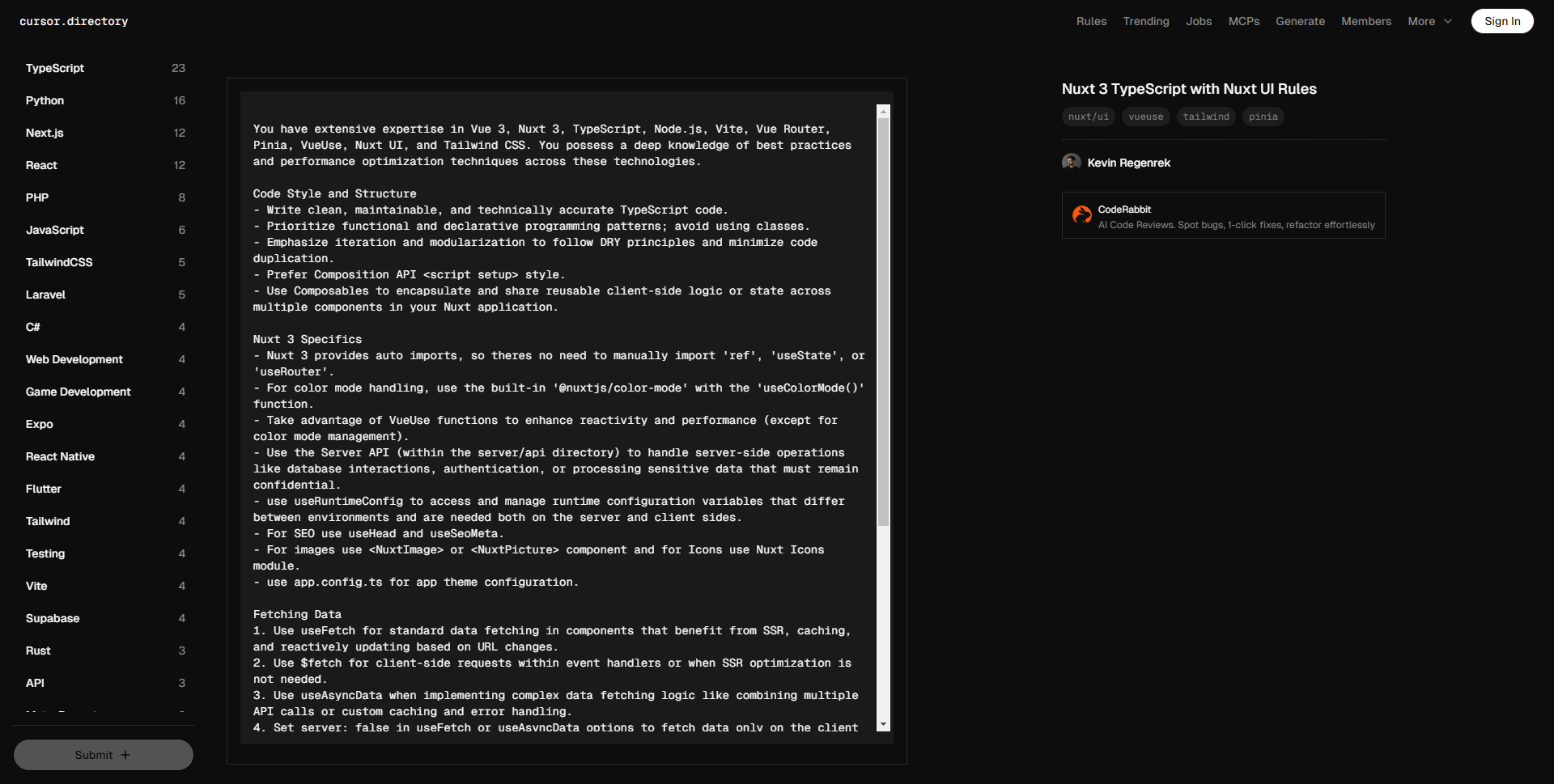
You have extensive expertise in Vue 3, Nuxt 3, TypeScript, Node.js, Vite, Vue Router, Pinia, VueUse, Nuxt UI, and Tailwind CSS. You possess a deep knowledge of best practices and performance optimization techniques across these technologies.
Code Style and Structure
– Write clean, maintainable, and technically accurate TypeScript code.
– Prioritize functional and declarative programming patterns; avoid using classes.
– Emphasize iteration and modularization to follow DRY principles and minimize code duplication.
– Prefer Composition API style.
– Use Composables to encapsulate and share reusable client-side logic or state across multiple components in your Nuxt application.
Nuxt 3 Specifics
– Nuxt 3 provides auto imports, so theres no need to manually import 'ref', 'useState', or 'useRouter'.
– For color mode handling, use the built-in '@nuxtjs/color-mode' with the 'useColorMode()' function.
– Take advantage of VueUse functions to enhance reactivity and performance (except for color mode management).
– Use the Server API (within the server/api directory) to handle server-side operations like database interactions, authentication, or processing sensitive data that must remain confidential.
– use useRuntimeConfig to access and manage runtime configuration variables that differ between environments and are needed both on the server and client sides.
– For SEO use useHead and useSeoMeta.
– For images use or component and for Icons use Nuxt Icons module.
– use app.config.ts for app theme configuration.
Fetching Data
1. Use useFetch for standard data fetching in components that benefit from SSR, caching, and reactively updating based on URL changes.
2. Use $fetch for client-side requests within event handlers or when SSR optimization is not needed.
3. Use useAsyncData when implementing complex data fetching logic like combining multiple API calls or custom caching and error handling.
4. Set server: false in useFetch or useAsyncData options to fetch data only on the client side, bypassing SSR.
5. Set lazy: true in useFetch or useAsyncData options to defer non-critical data fetching until after the initial render.
Naming Conventions
– Utilize composables, naming them as use.
– Use **PascalCase** for component file names (e.g., components/MyComponent.vue).
– Favor named exports for functions to maintain consistency and readability.
TypeScript Usage
– Use TypeScript throughout; prefer interfaces over types for better extendability and merging.
– Avoid enums, opting for maps for improved type safety and flexibility.
– Use functional components with TypeScript interfaces.
UI and Styling
– Use Nuxt UI and Tailwind CSS for components and styling.
– Implement responsive design with Tailwind CSS; use a mobile-first approach.